Build fail high voltage power supply test

Pete

New member
Kaiju Assembly Probelms

I seems to have hit a problem where I need your help: I completed up until page 46 (European A4 formatting, and went on to the testing of the “High Voltage Power Supply Test”. The results were.

w/o tubes

10U: 237V discharging after the test to -18V

14U: 486V discharging to 0V

15U: 234V discharging to-15V


With tubes

53U: 66V

65U: 219V


The last measurement is the problem. I added the other for info to give you further info.

I have:

Gone through the assembly process from page 1-47 and checked all step virtually

I have measured “across” all solderings to check for connection (0ohm on the DMM)

Visually inspected the assembly under a magnifying glass and found no errors

I can also add the I measured all resistors to verify identification before assembly

Capacitors and transformers were not measured


Can you help me out based on above or do you need more information.

How do I identify faulty components after assembly - all ideas are welcome

Best regards Pete
 
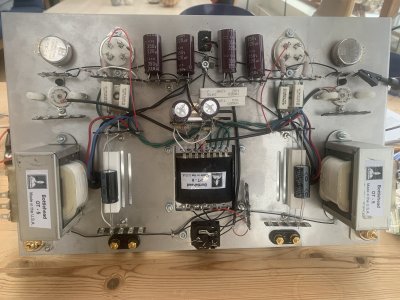
Could you post some build photos?

I'd expect the problematic reading at 65U to be from inserting a 300B incorrectly, with the fat pins not in the fat socket holes, which will cause excessive voltage at 65U.

The other thing that can happen is that the ground reference for pin 3 on the 4 pin socket could be loose or absent (the 249K resistor) which could also allow for excessive voltage to accumulate at 65U.
 
Could you post some build photos?

I'd expect the problematic reading at 65U to be from inserting a 300B incorrectly, with the fat pins not in the fat socket holes, which will cause excessive voltage at 65U.

The other thing that can happen is that the ground reference for pin 3 on the 4 pin socket could be loose or absent (the 249K resistor) which could also allow for excessive voltage to accumulate at 65U.
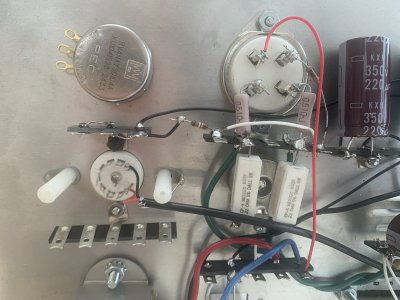
I have uploaded 2 pictures. The seatings of the tube(s) is "Snug" and "Easy", and the tubes end up both with the lionhead faciing backwards.
I have checked the 249K resistirs and checked the soldering by measure resistance from "metal to metal"
Result 219V from 65

Can any if the component be DOA? I checked 100% of the resistors, so only capacitors and tubes is at stake

Regards Pete
 
Just to add that the 219V reading on the DMM appears instantaniously whereas the other channel with the correct reading "boots up" taking some seconds to reach the end voltage and be stable ....

A capacitor issue? Which one?

Rgds. Pete
 
The instantaneous reading most likely means that the 300B is plugged in with the fat pins not in the rear set of holes.

On your build, when the manual says "attach", you need to pass a lead through the terminal strip, then bend it up 90 degrees against the terminal. This will give the solder more of an area to flow and to hold onto the joint. If you just pass a component through a hole and solder it with no bend, you're more likely to end up with a bad solder joint that's prone to failure down the road.

All of the solder joints in this amp show an iron that's not hot enough and/or lead free solder being used.
To view this content we will need your consent to set third party cookies.
For more detailed information, see our cookies page.

It is also possible that terminal 56 is high because of a different solder joint issue, possibly the white wire on the hum pot on that side.

Now is a good time to get those joints flowed out before continuing on with the build.

(there is no component that is damaged/defective to create this problem)
 
All useful comments, but not sure that it suffice. Data on soldering: Weller soldering iron, small tip, Sn/PB 60/40 core material. Soldetring temperature 365 oC (700 oF).

The reason for some not pyramid shaped soldering connections is resoldering makes the solder stiff when you apply more solder. I will (and have) used the procedure of soaking off (solder pump) some of the solder after applying some solder to soften the solder before the resoldering.
I will review all "bloobs" and follow your other advice.

Quick note: When you write "terminal 56" I assume you mean terminal 65.

Thanks for sharing the video, is quite useful, even for an somewhat experienced "solderer" like thge undersigned.

I will follow your proposals and do some resoldering, The mishaps may be in some of the multi-connection joints on the board the video advice on heating wires will be applied

It will likely take me quite some time to cpmplete.

I am not quite sure why you repeat the 300B seating as I find no other way than "lion" (or whatever creature) facing "back" or "Inside" of the board. I have rotated the tube and only this way the tube goes in as seats well (I can easily see the well seates ends of the connecting pins on the inside of the amp.

Regards Pete
 
If your iron will go higher than 365C, then feel free to crank it up, as that may help. 480C is about where I solder.

It's just a frequent problem we find where a 4 pin tube can be forced into the socket the wrong way, and in this manner the filament can short the plate connection to the cathode bias resistor, which creates the appearance of high cathode bias voltage.

You can try swapping the 300B tubes between sides to verify that the issue stays on the same side.
 
I don’t own a Kaiju, so maybe I shouldn’t speculate. But the pins on the 300B socket are not oriented the same. Could one socket be installed backwards?
 
The pin issue is only an issue if you force in the tubes (a lot of force - I haven't tryed how much ...). The fault I described above comes from a faulty souldering. The wire can go through the soldering tabs, which it did in this case and the soldering will due to the plastic shield on the wire just melt into a mess. Pulling wires out 1mm to see the metallic wire is one way that willl prevent this error and soldering can be made on both sides of tha tab (reminds me of Audio Research boards ...)
For detais, it was the 41 tab that had this problem. Solved by liquifying the solder, pull it back 1mm and solder it in this position.
Also, I had useful information on where the error was by using a cheap little instrument called Multi Function Tester.´: That analyses via some software the component (and its "environment") and reads out that data non a small screen. As I had one channel working I could analyse for differences in the amp and faster find the error.
 
Comment to Paul: The video you linked in your post above is really good and following the advice helps getting. the amp working. One particular element - multi-wireing-soldering is key to success. The video tells you to heat the tab and the wires all at the same time before applying the solder. Though it requires you to seen the soldering well and apply the soldering it ensures correct and connected project.
I would add the applying high temperatures "burns out" the solder, so it gets hard, and you will have to add a tiny bit of fresh solder if the need to resolder something appears
 
Back
Top