static/crackling in left channel

Paul Birkeland said:
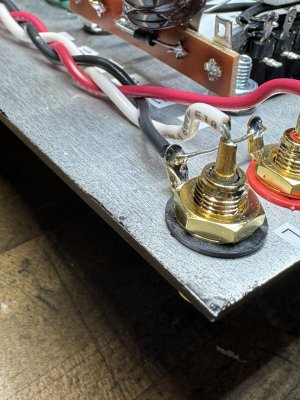
The left RCA jack ground lug and the chassis earth lug by the power entry module do not look adequately soldered, just as an example.

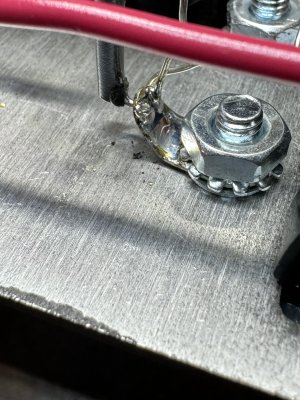
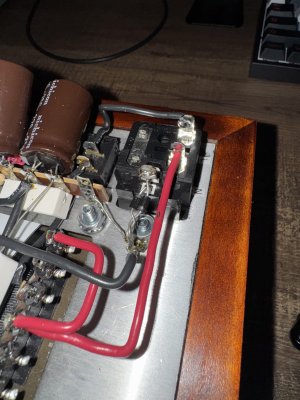
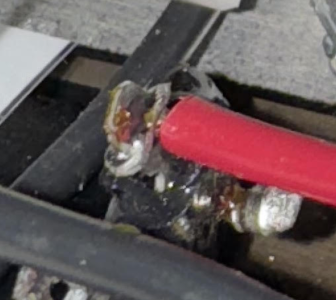
reflowed those 2 connections. pics attached. didn't change anything. then tried to go over a bunch of joints and reflow them and now i actually think it sounds worse. so it probably is something to do with a soldering joint but short of redoing the entire thing, not sure how i can isolate it.
 

Attachments

  • low 2.jpg
    low 2.jpg
    1.1 MB · Views: 19
  • flow.jpg
    flow.jpg
    1.1 MB · Views: 22
The last "flow" pic basically hasn't. I use Cardas solder and it flows easily and gives a smooth finish. I use #7 bits in my old Weller solder station. It has no adjustment. If this pic shows a joint similar to others in your build I would say that upping your technique would be a useful move.
 
Im resurrecting this thread since I never resolved my issue and had just shelved the BHC until now. Id really like to get it working. I added this mod: https://forum.bottlehead.com/index.php?topic=11676.0 and it didnt solve the issue. Snapshot attached.

I was able to grab a voice memo recording of the crackle from my iphone. I held the phone about 1" from the driver. There are no RCAs hooked up to the BHC during this recording. 
 

Attachments

This looks like a poor solder joint to me. I don't see much of a fillet. It might just be the pic. But if it does accurately capture the joint, I would add solder here until a nice fillet is visible.
 

Attachments

  • Screenshot 2024-09-25 at 5.21.13 PM.png
    Screenshot 2024-09-25 at 5.21.13 PM.png
    1.3 MB · Views: 15
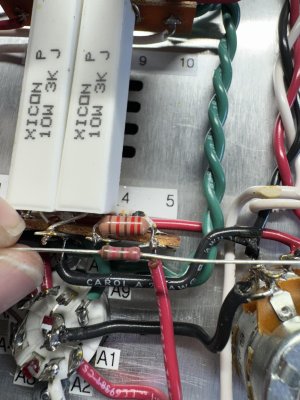
I finally solved the issue!!! It turns out it was a bad 22.1K Ω resistor that is soldered to terminals 4 and 5. I replaced the resistor and there is zero crackle, zero static. Dead silence until the music kicks in! I can finally enjoy some Crack! Now Im going to give it a few months and then I will do the speedball upgrade.

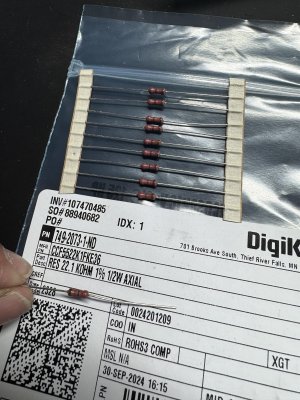
I do have a question. I bought the replacement resistor from digikey.  It appears to be rated the same and has the same color banding..but it is considerably smaller. See pics below. Is this OK?


Attachments

  • 22.1 resistor 2.jpg
    22.1 resistor 2.jpg
    793.8 KB · Views: 13
  • 22.1 resistor 1.jpg
    22.1 resistor 1.jpg
    1.5 MB · Views: 15
It's a funny thing about that resistor, as it dissipates a bit under 1/2 a watt in the amp.  On that basis, you'd want to opt for a 2W resistor for optimal operation (PR-02/RR-02 are good for this).  The resistor we use is extremely conservatively rated, so it won't cause problems.  In practice, what you bought should run just fine for 2-5 years.
 
It's a funny thing about that resistor, as it dissipates a bit under 1/2 a watt in the amp. On that basis, you'd want to opt for a 2W resistor for optimal operation (PR-02/RR-02 are good for this). The resistor we use is extremely conservatively rated, so it won't cause problems. In practice, what you bought should run just fine for 2-5 years.
I believe my kit is having the same issue except with one of the output jack 2.49Kohm resistors. Can I replace one (or both) with a 2.4Kohm resistor that I already have? Or should I seek out a 2.49Kohm specifically
Thanks!
 
The 2.49K resistors don't really do anything once your headphones are plugged in, so it would be extremely unlikely that you'd get noise from them.

What is extremely common is for one of the black wires landing on the headphone jack to not be captured by solder, and that can make some noises that appear to originate from the headphone jack when you're poking around.
 
The 2.49K resistors don't really do anything once your headphones are plugged in, so it would be extremely unlikely that you'd get noise from them.

What is extremely common is for one of the black wires landing on the headphone jack to not be captured by solder, and that can make some noises that appear to originate from the headphone jack when you're poking around.
Great, I’ll check that out when I get the chance. To clarify, I went hunting for bad resistors based on this thread and one of the 2.49K resistors measured no resistance on my meter. Should I still replace?
 
That will usually happen if one of the 100uF coupling caps is installed backwards, so if that has happened, you're going to want to replace the 100uF cap as well.

Unless the resistor was physically damaged during installation, I'd be wanting to look for the reason it failed.
 
That will usually happen if one of the 100uF coupling caps is installed backwards, so if that has happened, you're going to want to replace the 100uF cap as well.

Unless the resistor was physically damaged during installation, I'd be wanting to look for the reason it failed.
It was mechanical, I replaced the resistor and also beefed up some of the solder joints. As far as I can tell the unwanted noise is gone!

Out of curiosity, what do these resistors do if they don’t really do anything when the headphones are plugged in?
 
When you turn the amp on and the 6080 starts warming up, the 100uF coupling caps have to charge, and that requires a connection to ground for the output side of the cap. We accomplish this by grounding the switched terminals on the headphone jack so the output of the caps is at ground potential with nothing plugged into the amp.

If you have headphones plugged in, the low DCR of the headphone voice coils provides a nice connection for this charging to happen, and the paralleled resistors will handle a little bit of this duty.

Where these resistors function in the circuit is when someone has a 1/4" to 1/8" adapter plugged into the 1/4" TRS jack, as the adapter will defeat the shorting function of the jack, so the resistors need to be there so the coupling caps charge properly and the output DC offset is held close to 0V until you plug headphones in.
 
Back
Top